Manage project access
Add users to a project
- In fredato, go to the "Projects" tab.
- Click on the three dots to the left of the project to open the menu. Then select "Manage project access".

- You will be directed to the project Gitlab page where you can add users.
- Invite a user by clicking “Invite member” or a group by clicking “Invite group”.
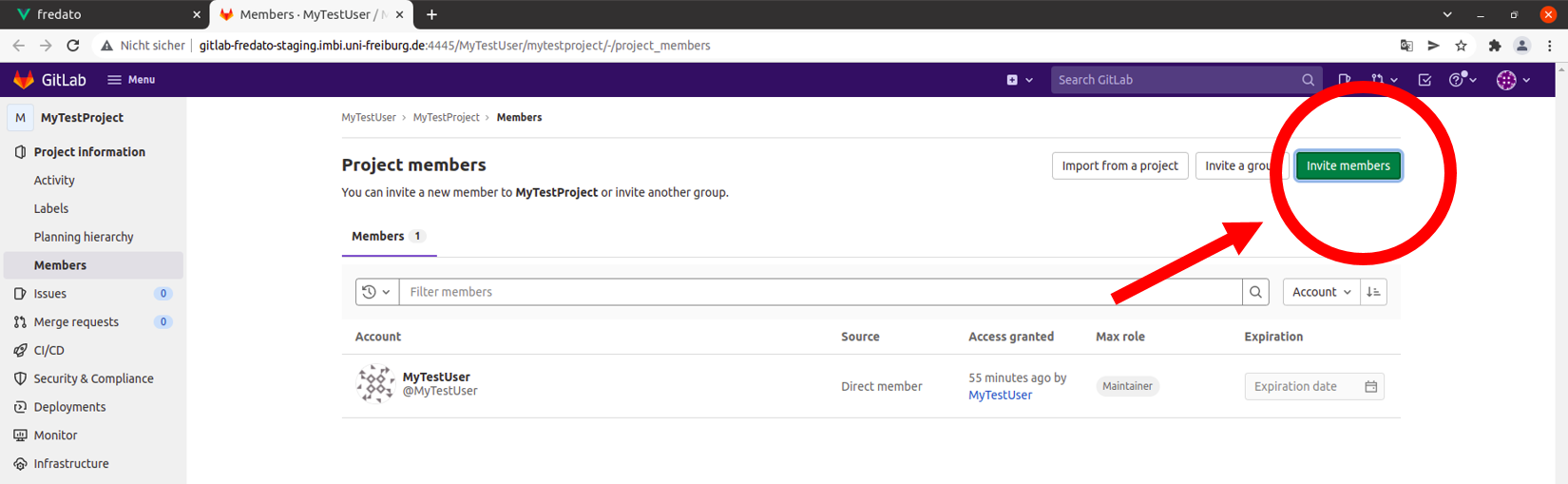
- Please put the name or email address of the person resp. group you want to add to your project into the field “GitLab member or Email address” resp. “Select a group to invite“.
- Please set permissions for the new project team member resp. group in the field “Select a role” resp. “Max role”. Select “Reporter” for read-only access or “Maintainer” for full control.
- You can set an “Access expiration date” for the project access of the new team member resp. group. This is an optional field. Leave it empty for “no expiration”.
- After you have filled in the fields as intended, click the “Invite” button.

Changed permissions will be synchronized with an existing Nextcloud checkout. This might take a few minutes to take effect.